
EMAIL DELIVERY GUIDE
Can't find an email from Fikry?
Emails from Fikry Fatullah ([email protected]) can sometimes land in Promotions, Updates, or Spam instead of your main inbox.
Here's how to find the message and help future emails reach the right place.
Find the email in your mailbox
Look for the sender "Fikry Fatullah dari KIRIM.EMAIL" with the email address [email protected] in the account you used to sign up.
In Gmail, check the Promotions and Updates tabs if it isn't in Primary. If you still can't find it, check Spam too.
 View full-size screenshot (new tab)
Move it to Primary
In Gmail on a computer, drag the message from Promotions or Updates to the Primary tab. If Gmail asks whether future messages from this sender should go there too, choose Yes.
On mobile, open the message and use your email app's move option to choose Primary or your main inbox, when available.
 View full-size screenshot (new tab)
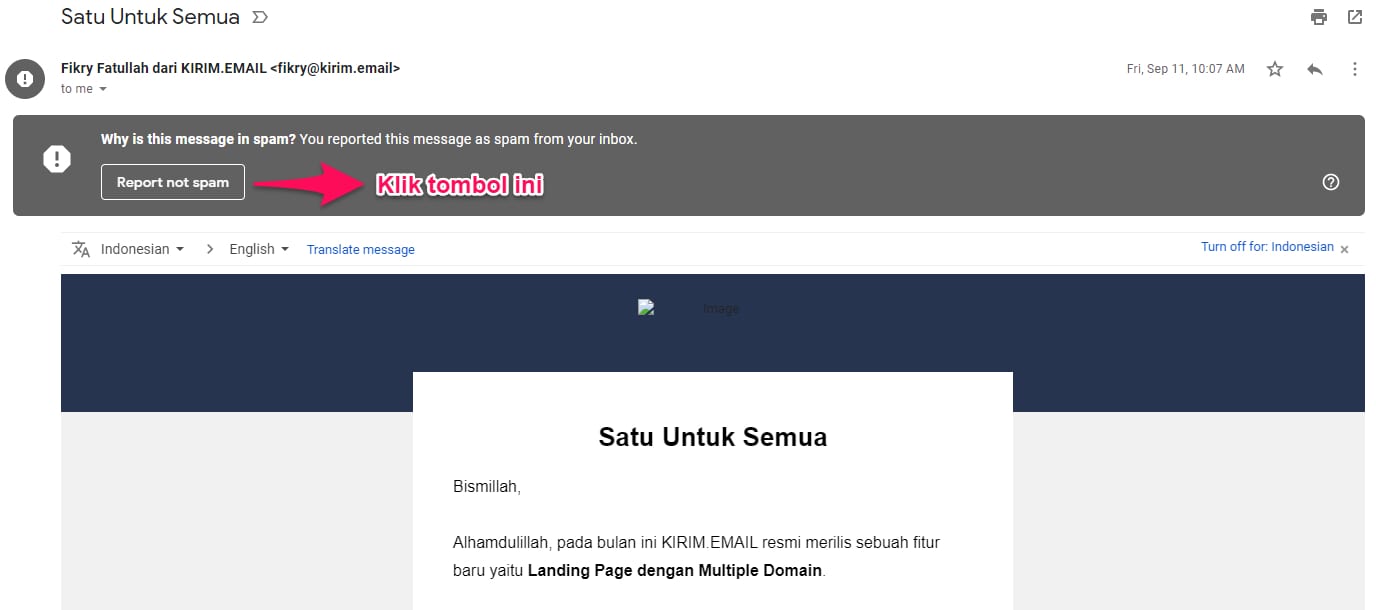
If it's in Spam, mark it as not spam
Open Fikry's message in Spam and choose Report not spam. In other email apps, look for the equivalent Not spam or Not junk option, then check your inbox again.
Only do this for a message you recognize and expected to receive.
 View full-size screenshot (new tab)